Advanced SQL
Window Functions
Window Functions
Window Functions
Activity Solutions
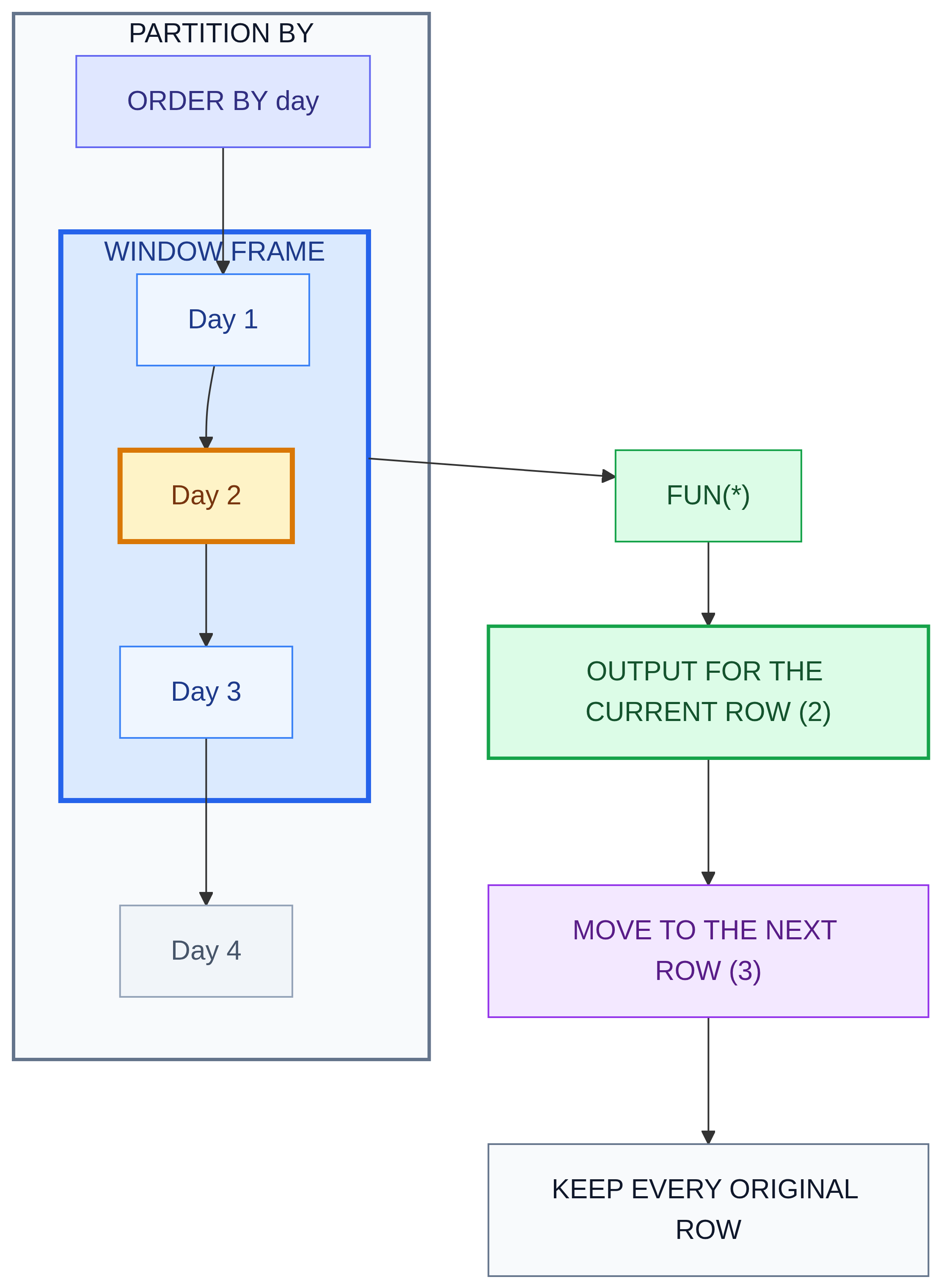
The “Window” Concept
Window 1
Window 2
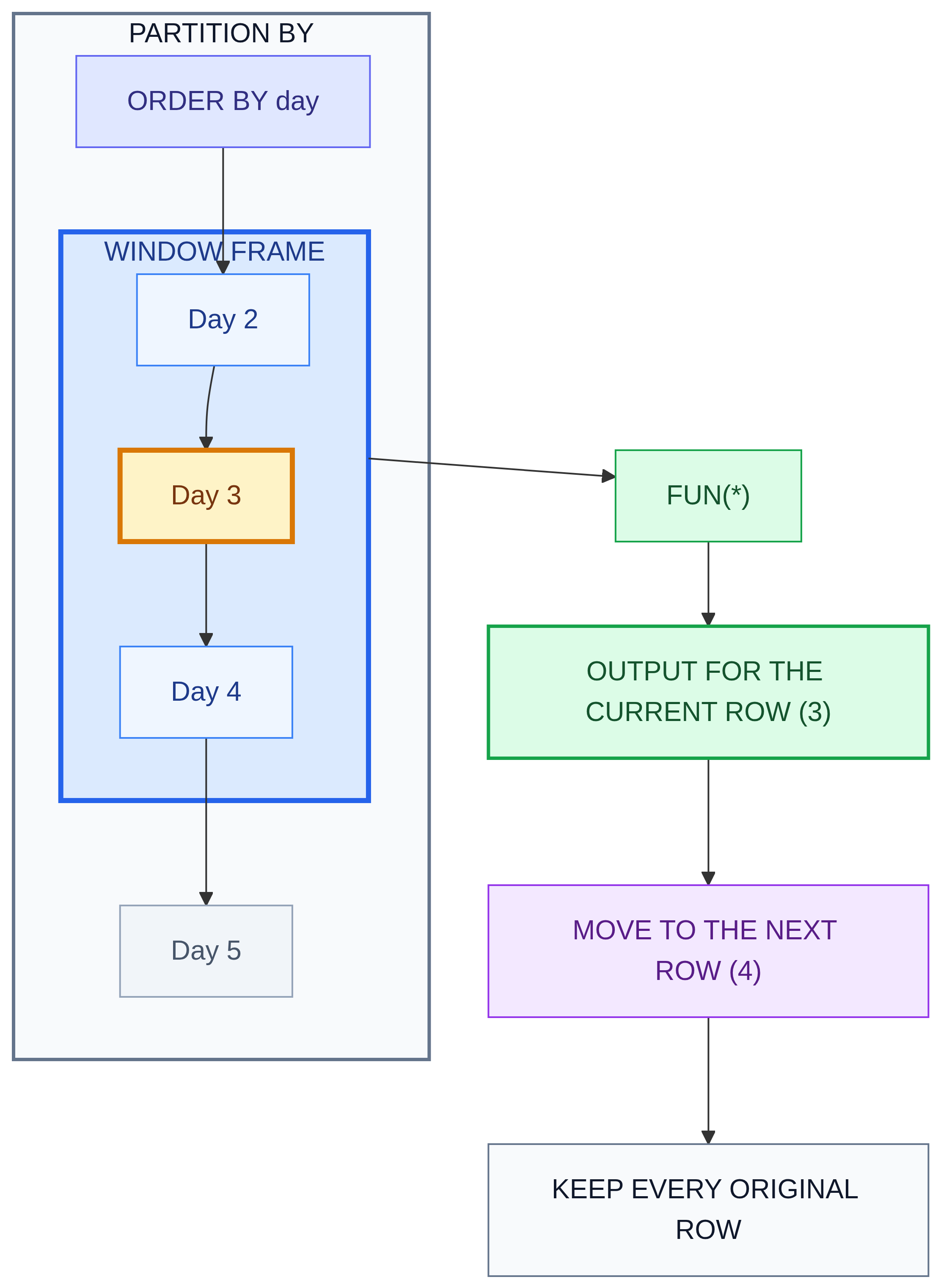
The “Window” Concept
- The “Window” is the subset of rows relevant to the current row.
- The window is defined by the
OVERclause.
Window Function Syntax
- 1
- Include this original column in the output. Window functions preserve individual rows.
- 2
-
Apply a window function, such as
SUM()orAVG(). TheOVER()clause defines how rows are organized for the calculation. - 3
- Divide the rows into partitions. The function operates independently within each partition.
- 4
- Define the order of rows within each partition for the calculation. This does not guarantee the display order of the final output.
- 5
- Name the calculated output column.
- 6
- Specify the table containing the data.
PARTITION BY
- Divides the result set into partitions.
- The function is applied to each partition separately.
- It is like
GROUP BYfor window functions, but it doesn’t hide the individual rows.
Activity 1
Using film, return film_id, title, rating, and length for every film with a nonmissing length. Add rating_avg_length: the average length of films with the same rating.
ORDER BY in Window Functions
- Crucial for:
- Running Totals (Cumulative sums).
- Rankings.
- Moving Averages.
- It defines the direction in which the window “slides” (e.g., from oldest to newest).
Ranking Functions: The Big Three
ROW_NUMBER(): Assigns a unique, sequential integer to rows (1, 2, 3, 4).RANK(): Assigns the same rank to ties, but skips the next number (1, 2, 2, 4).DENSE_RANK(): Assigns the same rank to ties, but does not skip numbers (1, 2, 2, 3).
Ranking Comparison Diagram
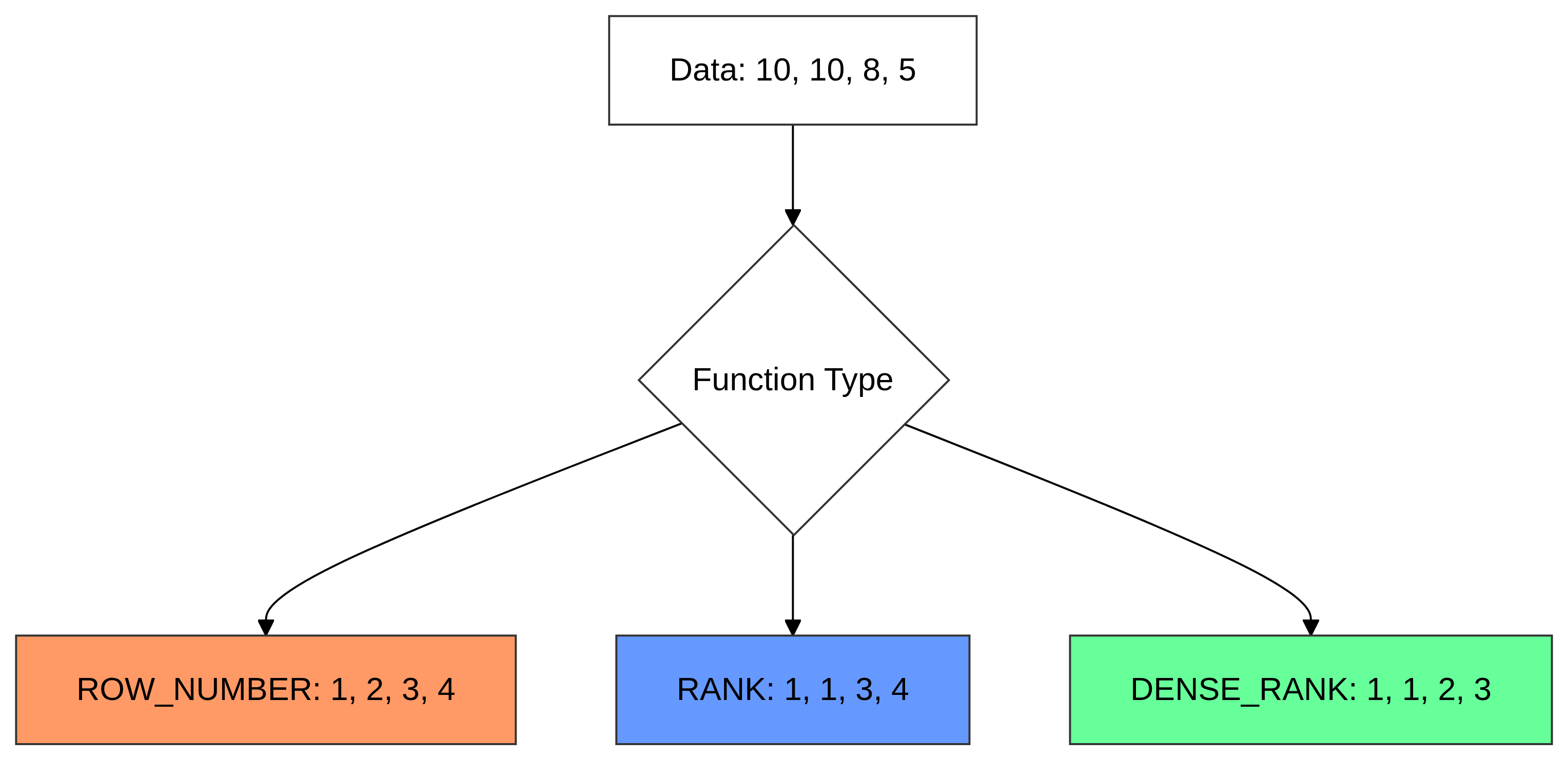
- Row Number: Strictly unique.
- Rank: Leaves gaps.
- Dense Rank: No gaps.
Activity 2
Using films with nonmissing lengths, rank films within each rating, longest film length first. Return film_id, title, rating, film length, and all three rankings:
ROW_NUMBER(): rank by filmlengthandfilm_id.RANK(): rank by filmlengthDENSE_RANK(): rank by film length
What does each ranking do?
Value Functions: LEAD and LAG
LAG(column): Accesses data from the previous row.LEAD(column): Accesses data from the following row.- Use Case: Comparing this month’s sales to last month’s sales to calculate growth.
Activity 3
Using payment, examine all payments for customer_id = 1, ordered by payment_date, then payment_id.
- Return
payment_id,payment_date, andamount. - Add
previous_amountfrom the preceding payment. - Keep the first payment even though no previous payment exists.
Activity 4
Using rental, examine every rental for customers 1, 2, and 3.
- Return
customer_id,rental_id, andrental_date. - Add
next_rental_datefor the same customer, ordered byrental_date, thenrental_id. - Add
days_until_next, rounded to two decimals. - Display by
customer_id,rental_date, thenrental_id.
Hint: In SQLite, JULIANDAY(later) - JULIANDAY(earlier) gives elapsed days, including fractions.
Window Frames: The “Moving” Window
Sometimes, you don’t want to look at the entire partition. You only want a subset of it.
ROWS BETWEEN ...UNBOUNDED PRECEDING: Start from the very first row of the partition.CURRENT ROW: End at the row you are on.1 PRECEDING: Look at exactly one row before.
Window Frames Example
Example: 3-Day Moving Average
Activity 5
Using payment, first create a CTE containing one row per payment date: payment_day and daily_revenue. Use DATE(payment_date) to remove the time.
- Return each observed payment date and its daily revenue.
- Add
running_revenue: revenue from the first observed date through the current row. - Add
moving_avg_3_rows: average daily revenue over the current row and up to two preceding rows. - Round monetary outputs to two decimals and display dates in ascending order.
Activity Solutions
Window Functions
Activity Solutions
Solution 1
- 1
- Compute the average across the entire rating partition. With no window ordering, this average is repeated for every film in that rating.
- 2
- Exclude missing lengths before calculating the window values.
- 3
- Set the displayed order independently of the window calculation.
Interpretation: A positive difference means the film is longer than its rating’s average. Unlike GROUP BY, this window calculation retains each film row.
Solution 2
SELECT film_id, title, rating, length,
ROW_NUMBER() OVER (
PARTITION BY rating
ORDER BY length DESC, film_id) AS row_num,
RANK() OVER (
PARTITION BY rating
ORDER BY length DESC) AS length_rank,
DENSE_RANK() OVER (
PARTITION BY rating
ORDER BY length DESC) AS dense_length_rank
FROM film
WHERE length IS NOT NULL
ORDER BY rating, length DESC, film_id;- 1
- Assign unique sequential numbers within each rating. The identifier gives tied lengths a repeatable order.
- 2
- Give equal lengths equal ranks; leave gaps after ties.
- 3
- Give equal lengths equal ranks without gaps between distinct lengths.
- 4
- Display ties in identifier order without changing their shared ranks.
Solution 3
- 1
- Select the columns to be displayed.
- 2
- Creates the window function and applies the lag function to obtain the previous amount.
- 3
-
Partitions by
customer_idand orders bypayment_dateandpayment_id. - 4
- Restrict the input to customer 1.
Solution 4
- 1
- Display the customer identifier, rental identifier, and rental timestamp.
- 2
-
Use
LEAD()to retrieve the following row’s rental date within the window. - 3
- Create a separate partition for each customer so the next rental belongs to the same customer.
- 4
-
Order each customer’s rentals chronologically. Use
rental_idto break ties when timestamps match. This controls the window calculation, not the final display order. - 5
-
Name the calculated column
next_rental_date. Each customer’s final rental returnsNULLbecause no following rental exists. - 6
-
Retrieve records from the
rentaltable. - 7
- Include only customers 1, 2, and 3. This filter applies before the window function is calculated.
Solution 5
WITH daily_sales AS (
SELECT DATE(payment_date) AS payment_day,
SUM(amount) AS daily_revenue
FROM payment
GROUP BY DATE(payment_date)
)
SELECT payment_day, daily_revenue,
SUM(daily_revenue) OVER (
ORDER BY payment_day
ROWS BETWEEN UNBOUNDED PRECEDING AND CURRENT ROW
) AS running_revenue,
AVG(daily_revenue) OVER (
ORDER BY payment_day
ROWS BETWEEN 2 PRECEDING AND CURRENT ROW
) AS moving_avg_3_rows
FROM daily_sales
ORDER BY payment_day;- 1
-
Create a common table expression (CTE) named
daily_salesto summarize payments before applying window functions. - 2
-
Extract the date from each payment timestamp, removing the time, and name it
payment_day. - 3
-
Group payments by date.
SUM(amount)calculates total revenue for each date, producing one row per observed payment date. - 4
- Display each payment date and its daily revenue.
- 5
- Order the daily rows chronologically for the running-total calculation.
- 6
-
Include every row from the beginning through the current row.
SUM()over this frame calculates cumulative revenue asrunning_revenue. - 7
-
Include the current row and up to two preceding rows.
AVG()calculates their average daily revenue. The first result uses one row, the second uses two, and subsequent results use three. These are observed payment dates, not necessarily consecutive calendar days. - 8
- Retrieve the daily summaries from the CTE. Both window functions preserve one output row per observed payment date.
- 9
-
Display the final results chronologically. The ordering inside
OVER()controls calculations but does not guarantee the final display order.