graph LR
    A[Table A] --- B{Join Condition}
    C[Table B] --- B
    B --> D[Combined Result Set]

    classDef table fill:#0072B2,stroke:#333,stroke-width:2px,color:#fff
    classDef logic fill:#E69F00,stroke:#333,stroke-width:2px,color:#000
    classDef result fill:#009E73,stroke:#333,stroke-width:2px,color:#fff

    class A,C table
    class B logic
    class D result
SQL: Joins, Subqueries, and Views
Agenda
- Relational Joins
- Inner, Left, Right, Full, Cross, and Self Joins
- Subqueries
- Scalar, Multi-row, and Correlated
- Database Views
- Virtual tables and Materialized Views
Joins
Joins
Subqueries
Views
Glossary
Activity Solutions
The Concept of Joins
To combine data from two or more tables, we use a common column (usually a Foreign Key).
Inner Join
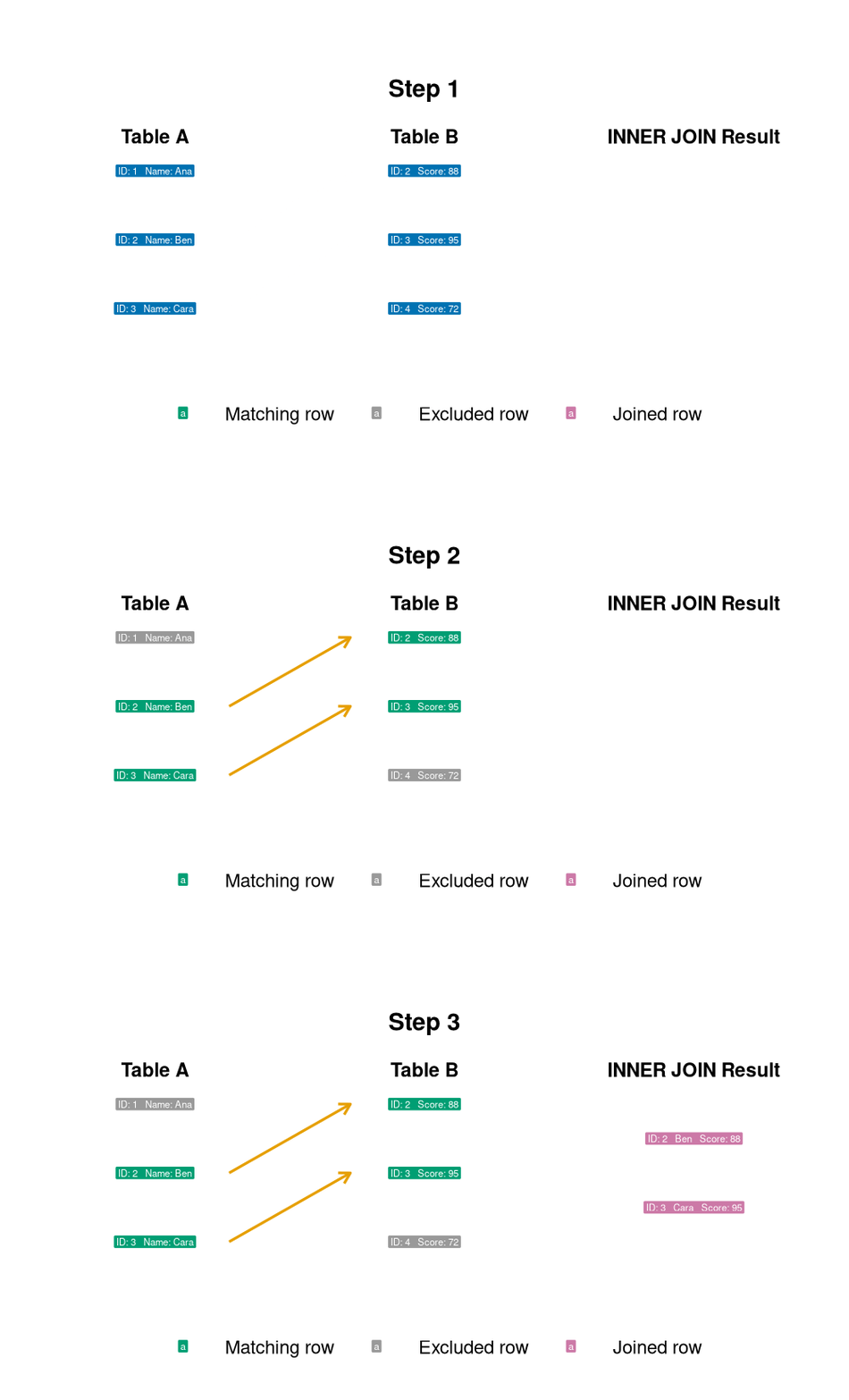
Inner Join
Returns records that have matching values in both tables.
- Only matches are returned.
- If an employee has no department, they are excluded.
- If a department has no employees, it is excluded.
Left Join
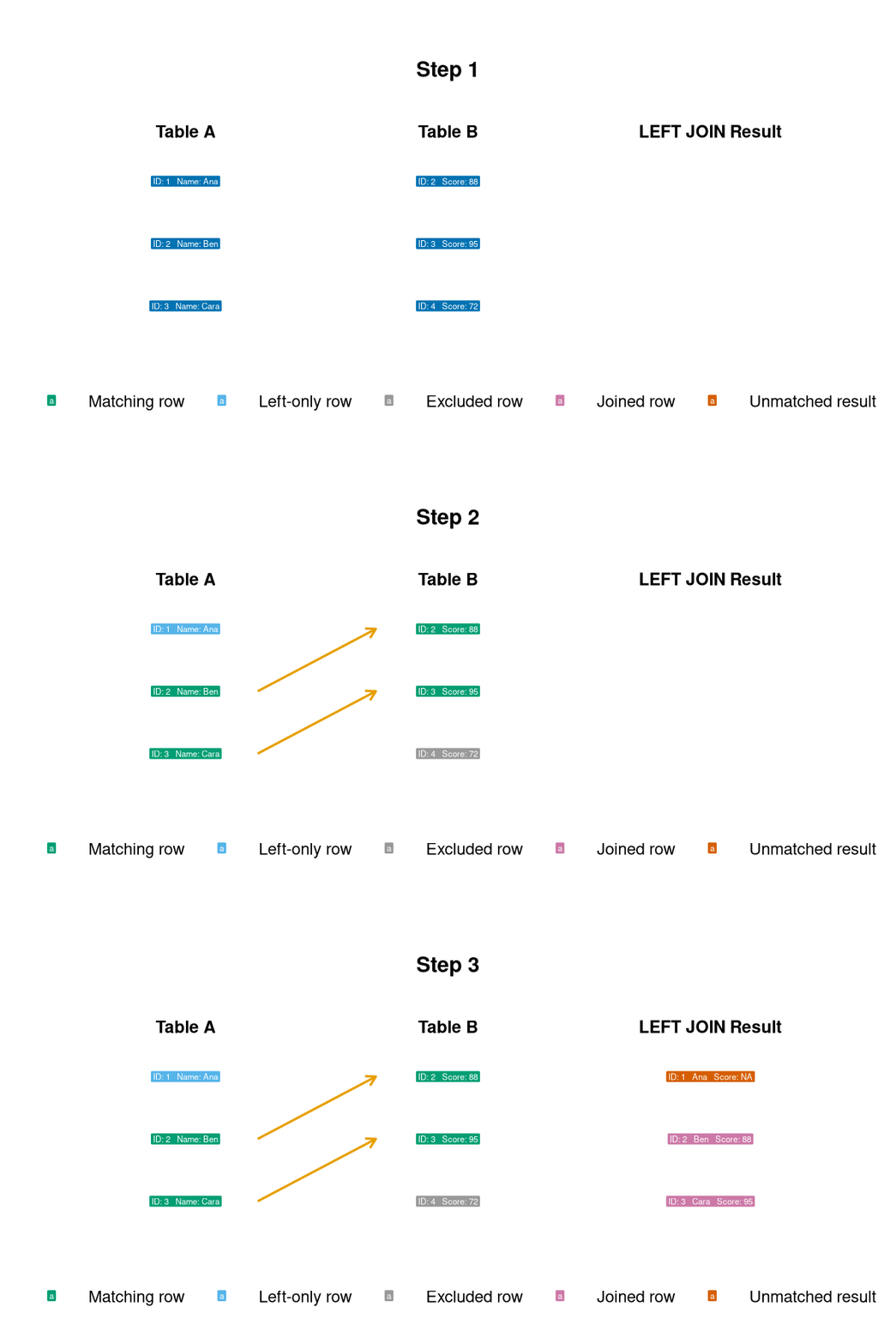
Left Join
Returns all records from the left table, and the matched records from the right table.
- If there is no match, the result is
NULLon the right side. - Useful for finding “missing” relationships.
Right Join
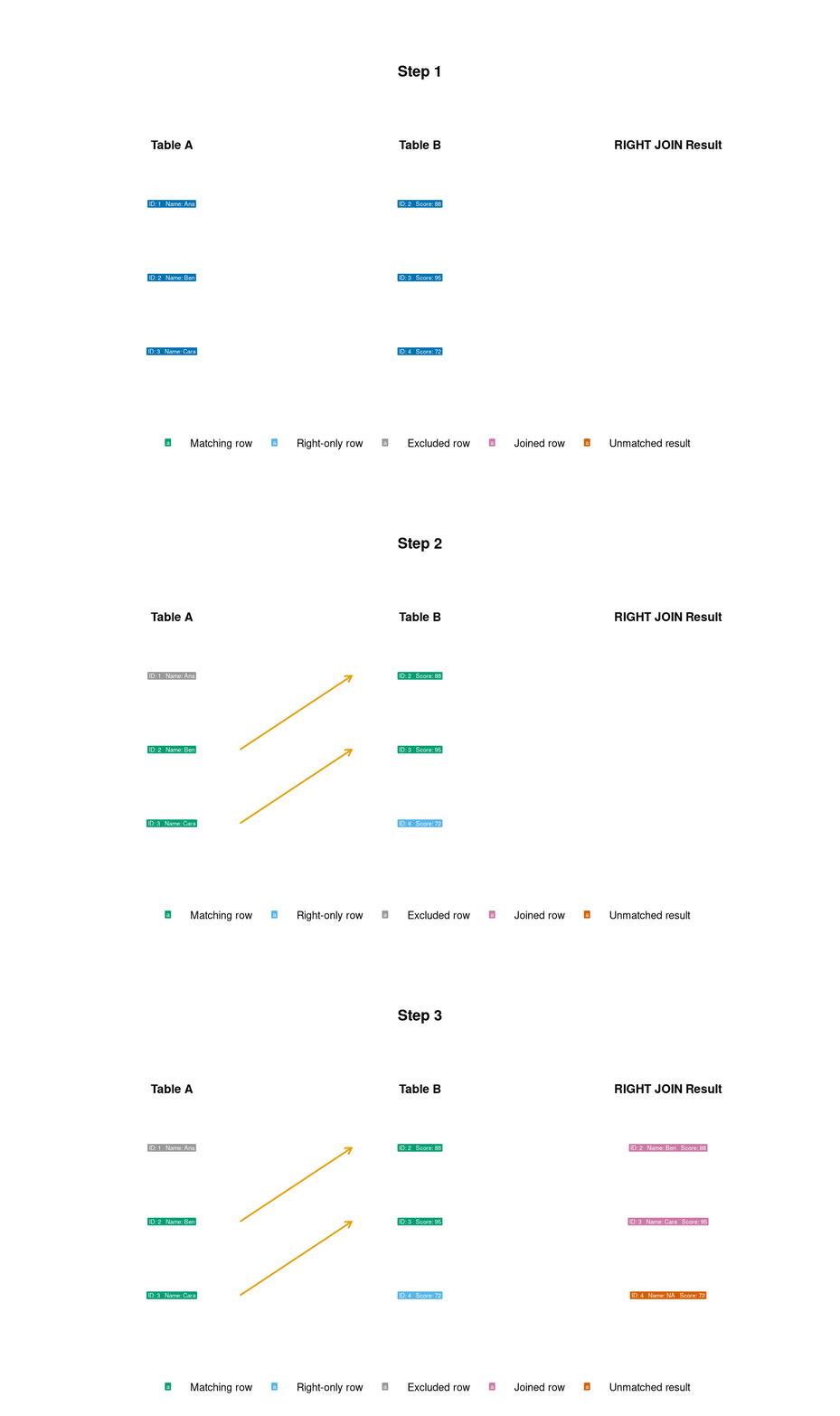
Right Join
Returns all records from the right table, and the matched records from the left table.
- The opposite of a Left Join.
- Includes all departments, even those without employees.
- Requires SQLite 3.39.0 or later.
Full Join
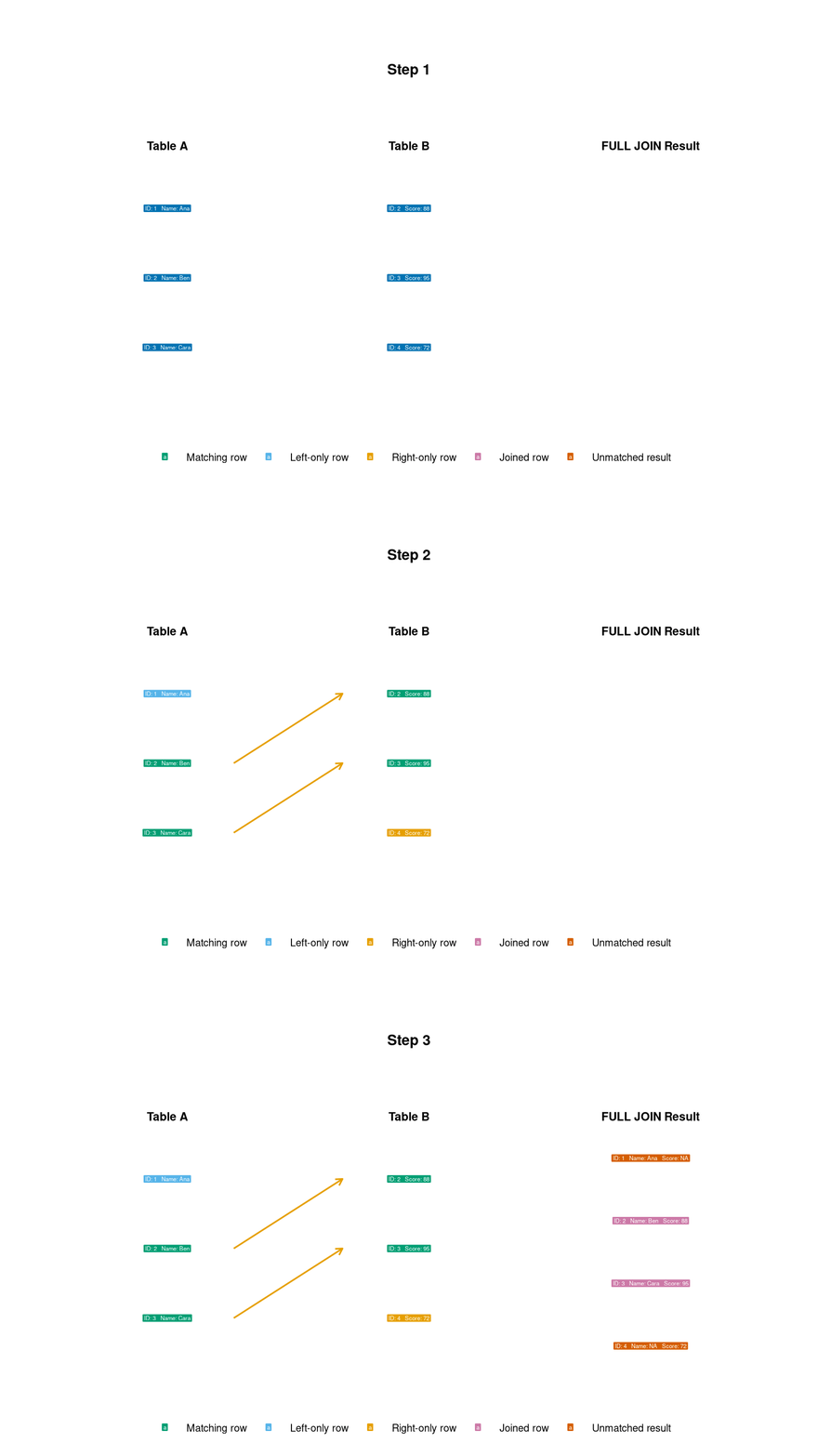
Full Join
Returns all records when there is a match in either the left or right table.
- Combines the effect of Left and Right joins.
- Provides a complete picture of all data in both tables.
- Requires SQLite 3.39.0 or later.
Self Join
A join where a table is joined with itself.
- Requires table aliasing (
e1,e2). - Used for hierarchical data (e.g., Employee -> Manager).
Activity: Joins
Use the Chinook database. Write one query for each task.
- Album catalog: Join
ArtistandAlbum. Return the artist name asArtistNameand album title asAlbumTitle. Sort by artist and album title. Match bYArtistID. - Long tracks: Join
TrackandGenre. ReturnTrackName,GenreName, andMillisecondsfor tracks longer than 300,000 milliseconds. Show the longest tracks first. Match bYGenreID. - Customer invoice coverage: Use a left join between
CustomerandInvoice. Return each customer’s ID, first name, last name, and invoice count. Keep customers who have no invoices. Match bYCustomerID.
Subqueries
Joins
Subqueries
Views
Glossary
Activity Solutions
Subqueries
A subquery is a query nested inside another query.
graph TD
    Outer[Outer Query / Main Query] -->|Contains| Inner[Inner Query / Subquery]
    Inner -->|Returns Data| Outer

    classDef outer fill:#0072B2,stroke:#333,color:#fff
    classDef inner fill:#E69F00,stroke:#333,color:#000

    class Outer outer
    class Inner inner
Scalar Subqueries
A subquery that returns exactly one value (one row, one column).
- Returns a single value for comparison.
- Often used in
SELECTorWHERE.
Multi-row Subqueries
Subqueries that return a list of values (one column, multiple rows).
- Common operators include
IN,ANY,ALL, andEXISTS. - Used to filter against a dynamic list.
- SQLite supports
INandEXISTS, but not the SQL-standardANYandALLoperators directly.
Activity: Subqueries
Use the Chinook database. Write one query for each task.
- Longer than average: Return the name and length in milliseconds of every track that is longer than the average track length. Use a scalar subquery.
- Rock and Metal tracks: Return the track name and unit price for tracks whose genre is either
RockorMetal. Use a multi-row subquery withIN.
Views
Joins
Subqueries
Views
Glossary
Activity Solutions
Views: Definition
A View is a “virtual table” based on the result-set of an SQL statement.
- It does not store data itself (unless it is a Materialized View).
- It is a stored query.
- It acts as a window into your real tables.
Views are not actual tables. They are saved queries that look and behave like tables.
Why use Views?
- Security: Hide sensitive columns (like salaries or SSNs) by creating a view that only shows non-sensitive info.
- Simplicity: Simplify complex joins into a single “virtual” table.
- Consistency: Standardize how specific logic (like “Active Customers”) is calculated across the organization.
Creating and Using Views
- You can use
SELECT,JOIN, andWHEREon a view just like a table.
Materialized Views
Unlike standard views, Materialized Views actually store the data physically.
- Pros: Extremely fast for heavy calculations or large aggregations.
- Cons: The data can become “stale” (outdated) and must be refreshed.
- SQLite note: SQLite does not provide native materialized views.
Activity: Views
Use the Chinook database to build and query a reusable customer summary.
- Create a view named
customer_invoice_summarythat returns each customer’s ID, first name, last name, and country. Include the number of invoices asInvoiceCountand the total amount spent asTotalSpent. - Query the view to show the 10 customers with the highest
TotalSpent.
Glossary
Joins
Subqueries
Views
Glossary
Activity Solutions
Glossary: Query Commands
| Command | Purpose |
|---|---|
SELECT |
Chooses the columns or calculated values to return. |
FROM |
Identifies the source table, view, or subquery. |
WHERE |
Filters individual rows before grouping. |
GROUP BY |
Combines rows that share the same values for aggregate calculations. |
HAVING |
Filters groups after GROUP BY. |
ORDER BY |
Sorts the result in ascending or descending order. |
LIMIT |
Restricts the number of rows returned. |
AS |
Assigns a temporary alias to a column, table, or calculated value. |
Glossary: Joins
| Command or term | Purpose |
|---|---|
JOIN / INNER JOIN |
Returns rows with matching values in both tables. |
LEFT JOIN |
Returns every row from the left table and matching rows from the right table. |
RIGHT JOIN |
Returns every row from the right table and matching rows from the left table. |
FULL OUTER JOIN |
Returns matched rows plus unmatched rows from both tables. |
CROSS JOIN |
Returns every possible pairing of rows from two tables. |
ON |
States the condition used to match rows. |
| Self join | Joins a table to itself by using separate table aliases. |
NULL |
Represents a missing or unknown value, including an unmatched outer-join value. |
Glossary: Subqueries and Views
| Command or term | Purpose |
|---|---|
| Subquery | Places one query inside another query. |
AVG() |
Calculates an arithmetic mean and can supply a scalar subquery value. |
COUNT() |
Counts rows or non-null values. |
SUM() |
Adds numeric values. |
ROUND() |
Rounds a numeric value to a specified number of decimal places. |
IN |
Tests whether a value occurs in a list returned by a subquery. |
EXISTS |
Tests whether a subquery returns at least one row. |
ANY / ALL |
Compare a value with some or every value from a subquery. SQLite does not support these operators directly. |
CREATE VIEW |
Saves a query as a virtual table. |
DROP VIEW |
Removes a view definition. |
REFRESH MATERIALIZED VIEW |
Updates stored materialized-view results in systems that support the command. SQLite does not. |
Activity Solutions
Joins
Subqueries
Views
Glossary
Activity Solutions
Joins Activity: Solution 1
Joins Activity: Solution 2
Joins Activity: Solution 3
Subqueries Activity: Solution 1
Subqueries Activity: Solution 2
Views Activity: Solution 1
CREATE VIEW customer_invoice_summary AS
SELECT
    c.CustomerId,
    c.FirstName,
    c.LastName,
    c.Country,
    COUNT(i.InvoiceId) AS InvoiceCount,
    ROUND(SUM(i.Total), 2) AS TotalSpent
FROM Customer AS c
INNER JOIN Invoice AS i
    ON c.CustomerId = i.CustomerId
GROUP BY
    c.CustomerId,
    c.FirstName,
    c.LastName,
    c.Country;